Table of Contents
What is a Feature Store?
You can think of a Feature Store like a table specifically managed for ML pipelines. If you’re familiar with the Medallion Architecture, Feature Stores can be thought of as silver tables that integrate with MLflow (a package that helps you organize ML models), and can help you keep track of which features are used in which machine-learning models. This benefit is amplified as your data team grows. Data Scientists and ML Engineers, even in different departments, will be able to see and use the organized features.
Summary: Feature Stores help you log and organize features for ML models.
Here’s the simplest example on how to create a Feature Store (this assumes you already have cleaned data in your silver or gold schema):
# Call in the Feature Engineering Client class
fe = FeatureEngineeringClient()

# Read in your dataframe from a
# silver or gold table you have created
full_df = spark.read.table("catalog.silver.your_table")

# Drop the prediction target column
features_df = full_df.drop("column_to_predict")

# Write your data to a feature table using
# the create_table() method
fe.create_table(
  name=table_name, # Give your feature store a name with the "<catalog>.<schema>.<table>" format
  primary_keys=[primary_key], # The table needs a primary key
  df=features_df, # Your table with your features (but not your target)
  schema=features_df.schema,
  description="your dataset features"
)
There! Now you can use the table_name feature store you created to train an ML model.
You can find your features table under the Features tab on Databricks’s left-hand menu:
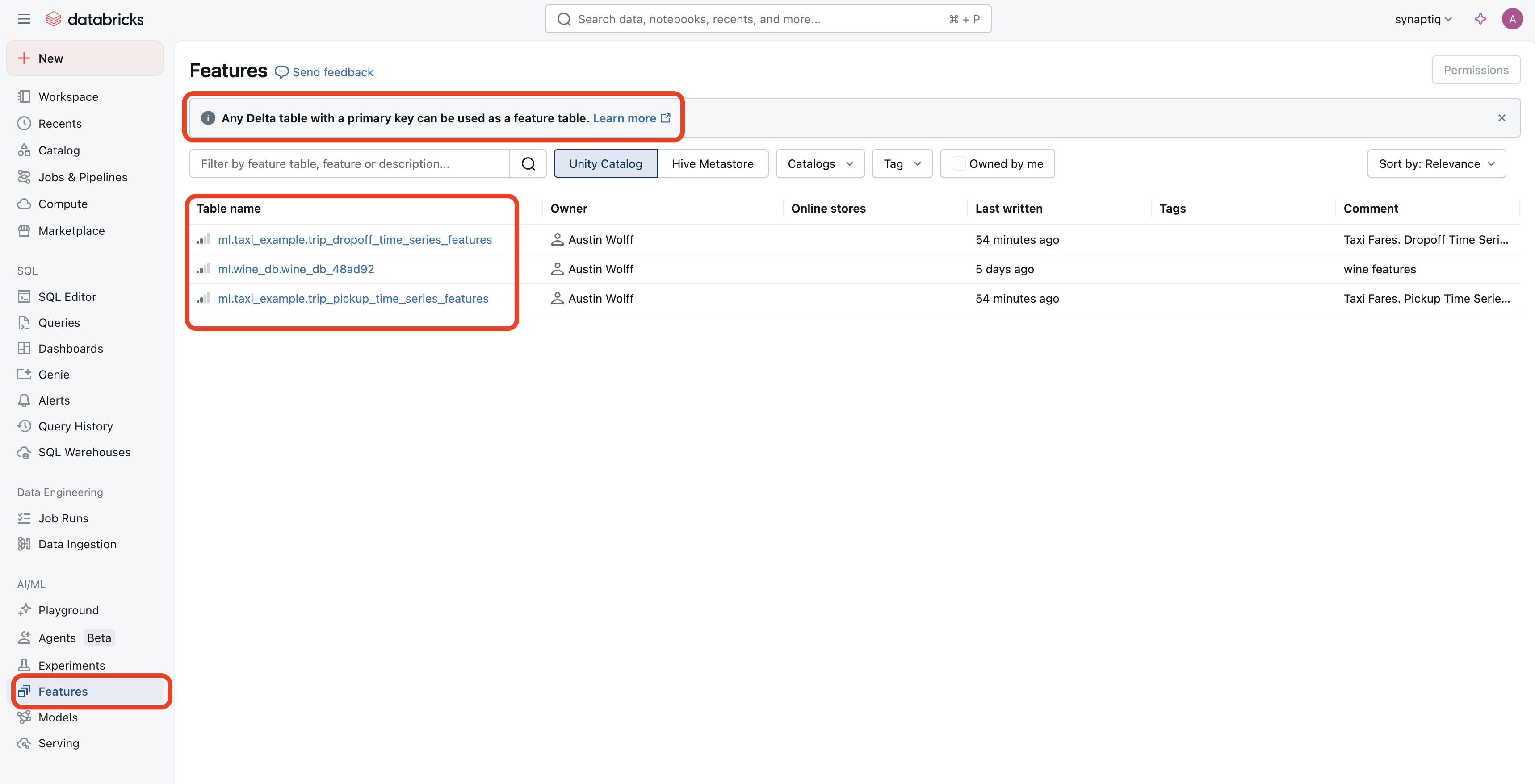
When you click on one of your Feature Stores, you will be taken to where it resides in your Catalog. I’m writing this only to further point out that “Feature Stores” are conceptually just “Silver Tables” with additional benefits such as discoverability, integration with model scoring and serving, point-in-time lookups, and lineage.
In other words, Feature Stores are Delta Tables wrapped with ML governance and lifecycle tools. Now, I’ve drawn attention to the Lineage tab:
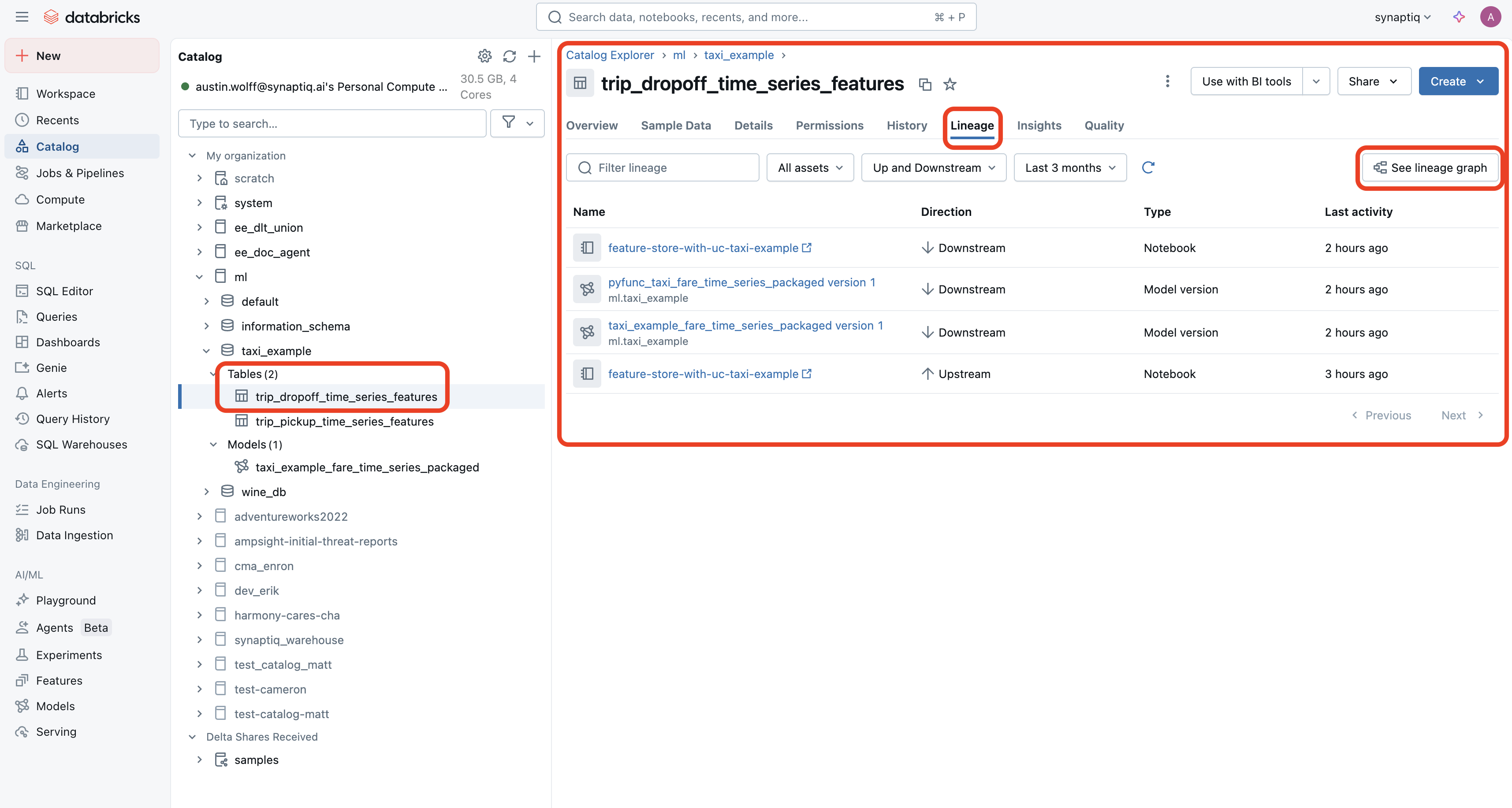
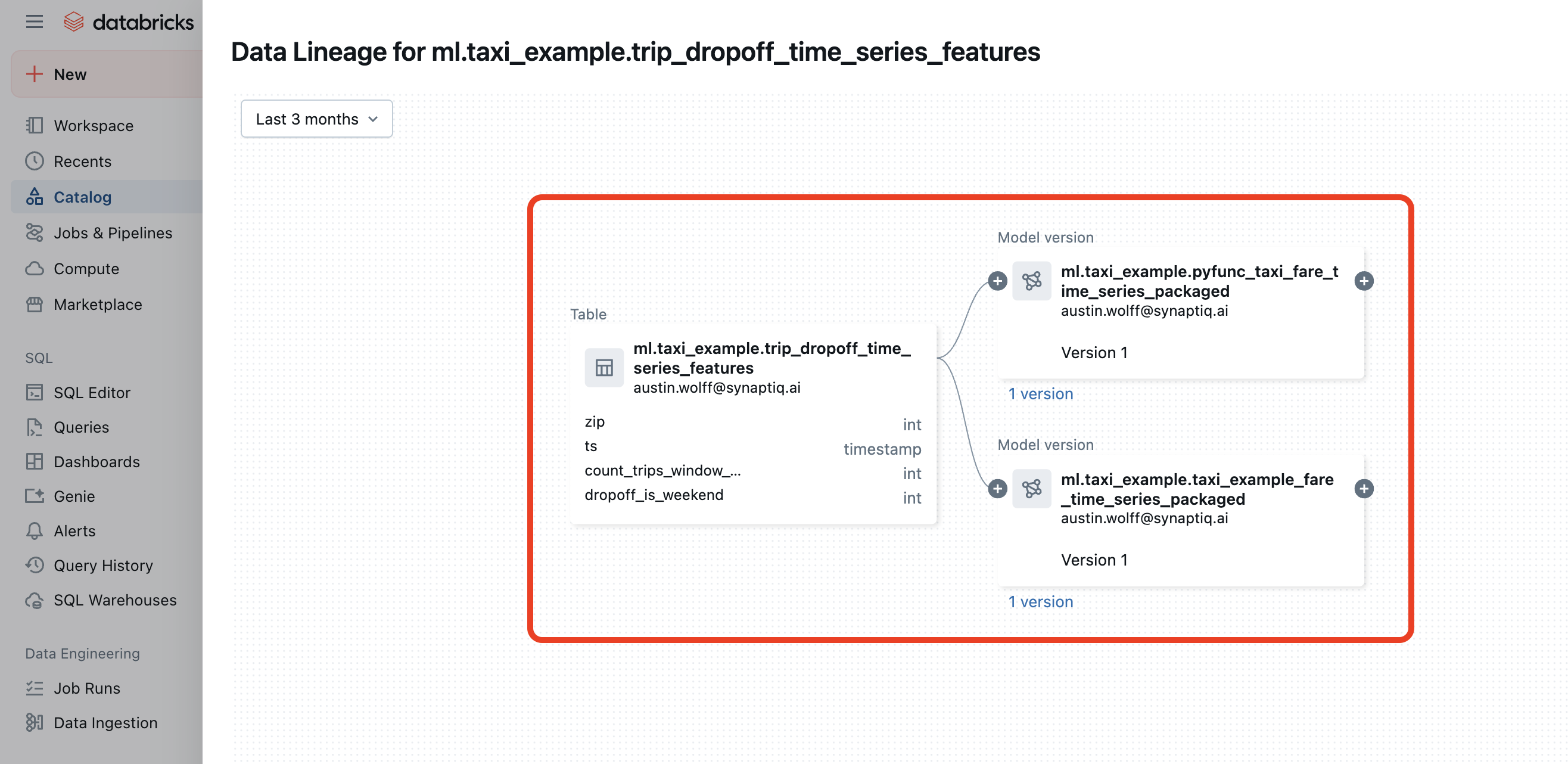
Here, you can click the See lineage graph button to visually see which ML models use this particular feature store:
This was just one example of how Feature Stores are basically Delta Tables with additional ML-pipeline support. For a more in-depth walkthrough on Feature Stores, you can read this example from Databricks.
Lineage Differences When Using a Feature Store
If you don’t use a Feature Store, no ML models will be associated with your dataset’s lineage:
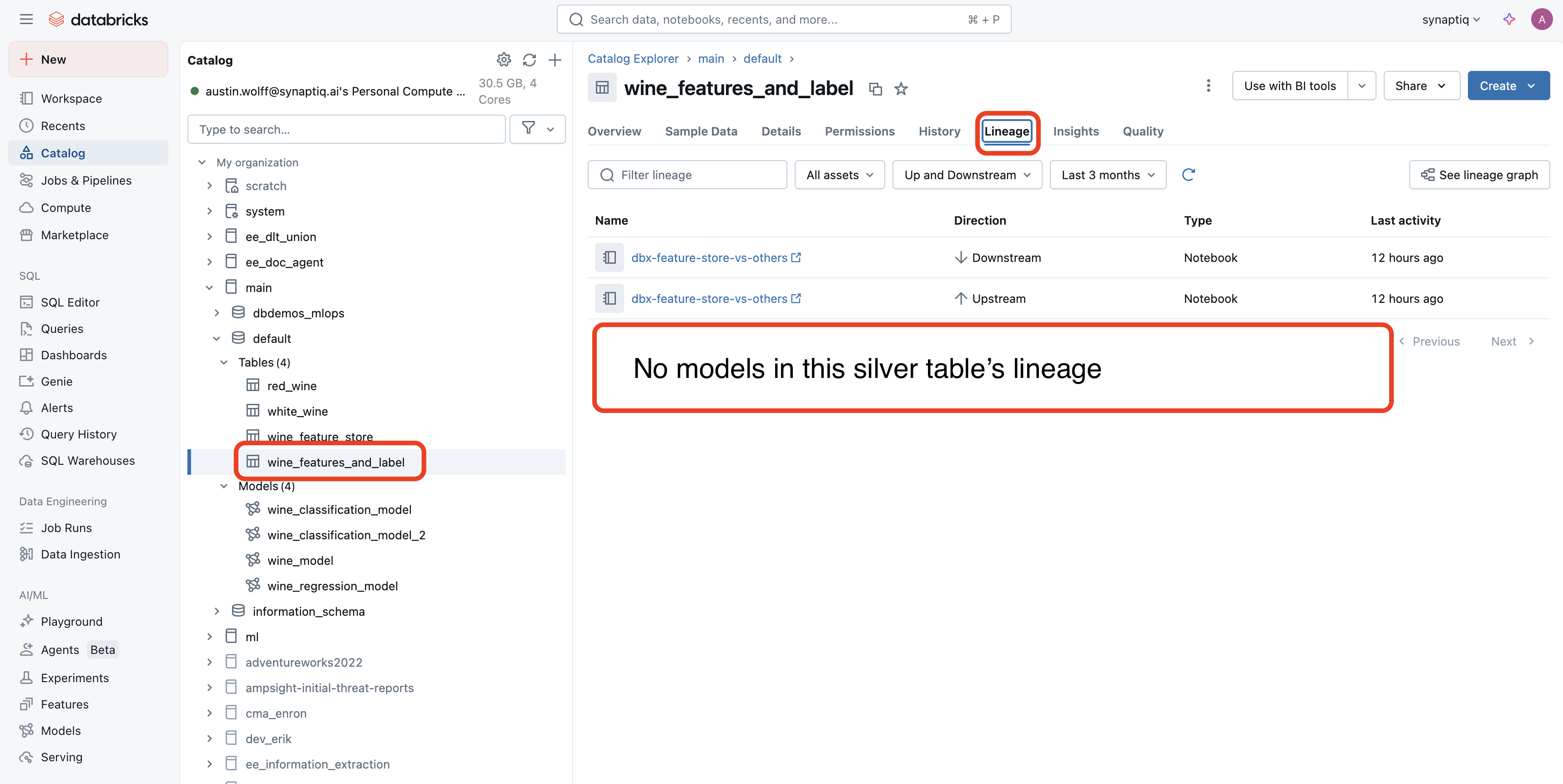
Contrast this with the lineage of a Feature Store:
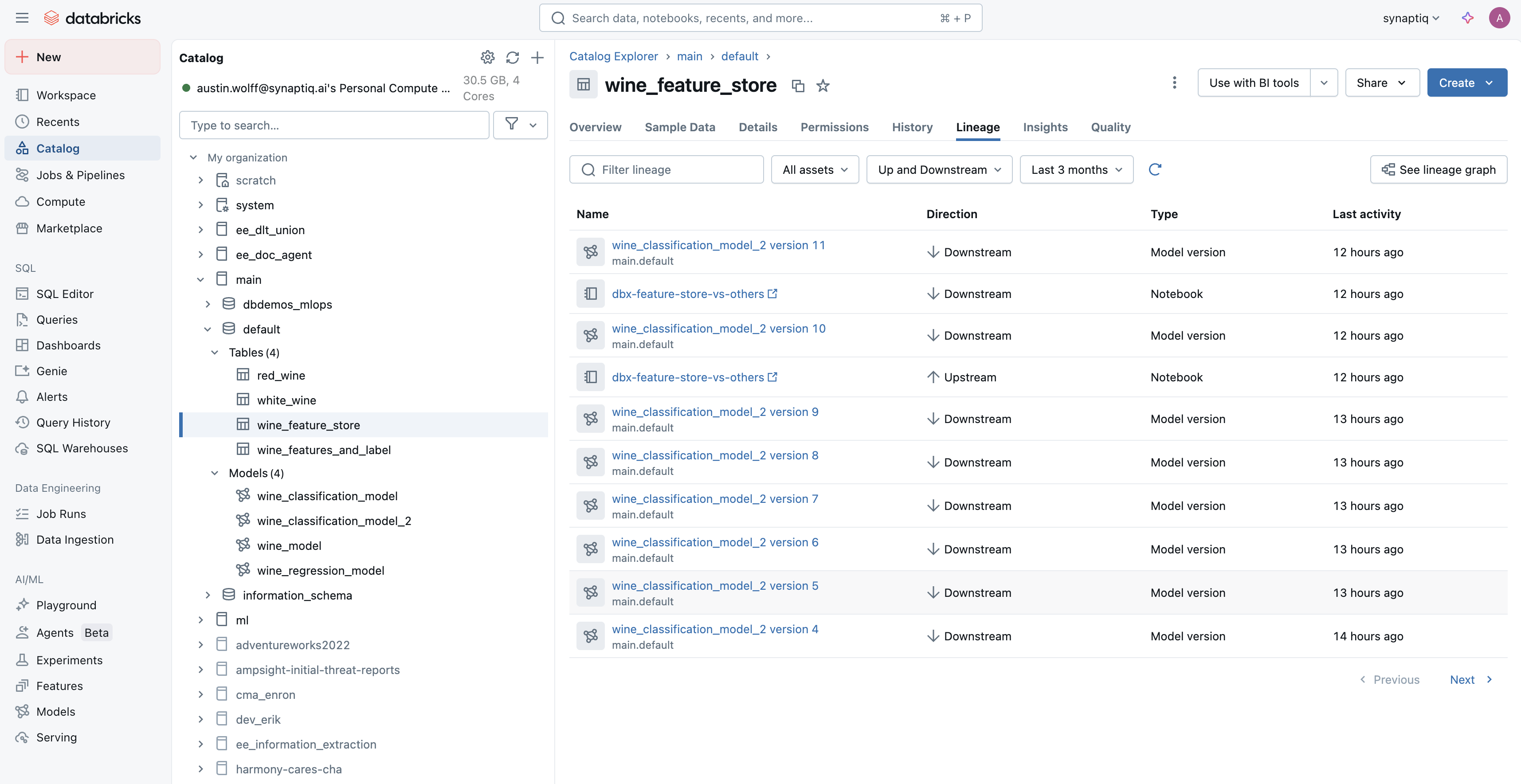
As you can see, when we use a Feature Store, not only is that data associated with the ML models it helps train, it also is associated with each version of the model.
Data Tracking Differences With a Feature Store
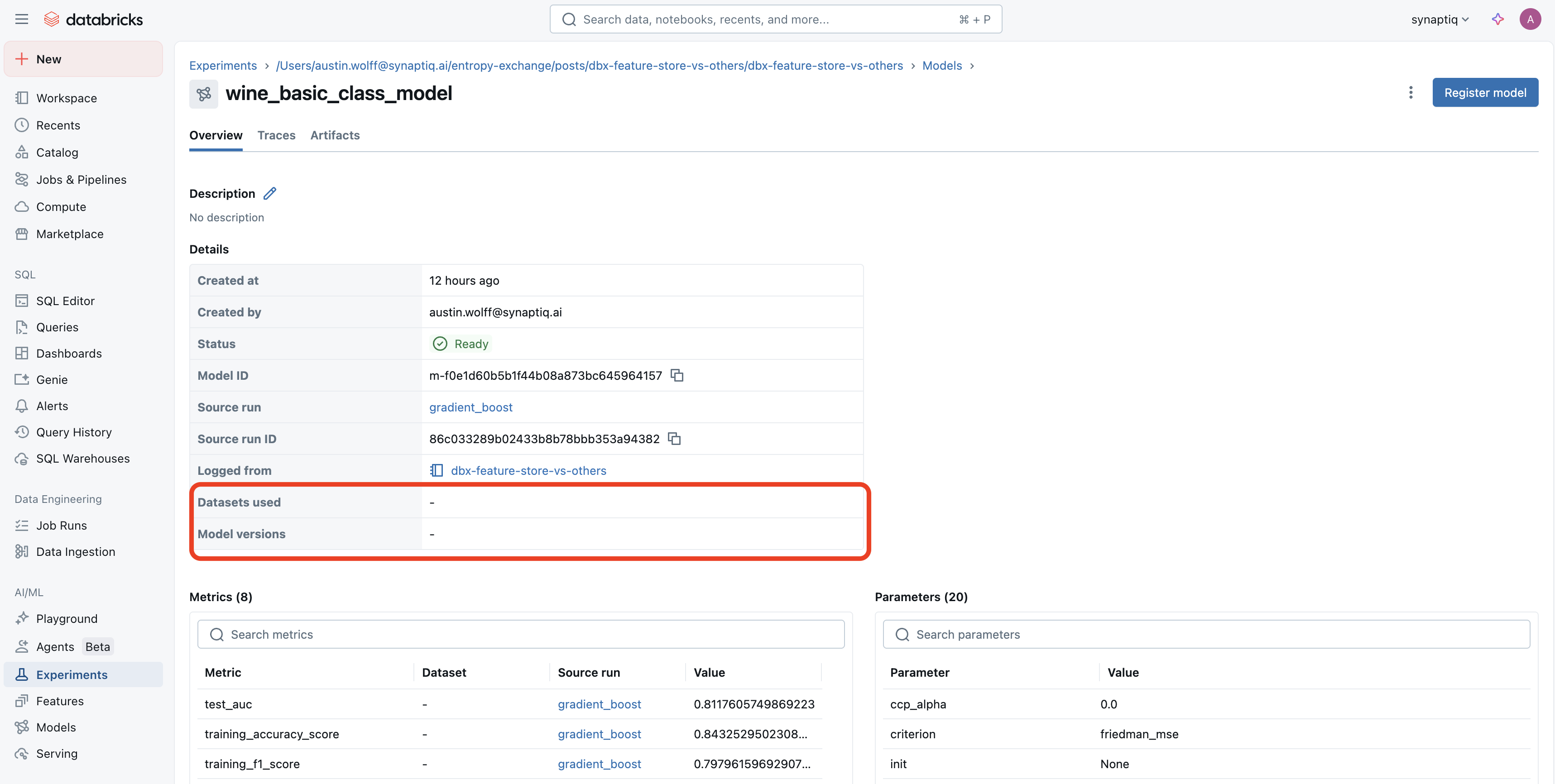
If we don’t use the Databricks Feature Engineering Client (along with a Feature Store), it becomes harder to track the datasets used in a given model. Version tracking also isn’t as easy:
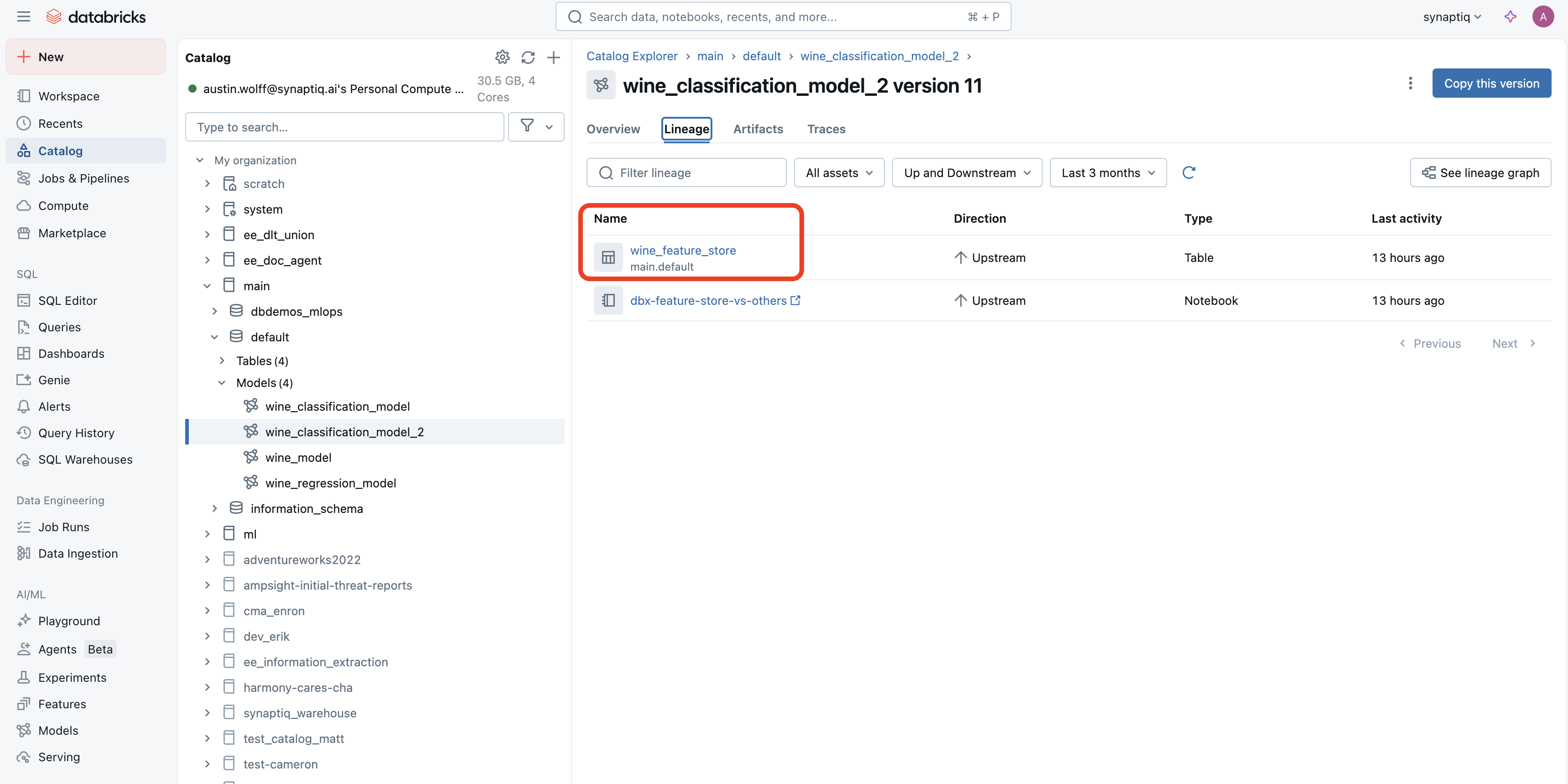
Contrast that with using a Feature Store and the Databricks Feature Engineering Client. When navigating to a model used in an experiment, we are taken here instead, which tells us which feature store was used (in addition to the model version):
Coding Differences With a Feature Store
I go into much greater detail on the coding differences between training a model with and without the Databricks FeatureEngineeringClient here. However, I will give a small example on the topic of batch scoring. Say you’ve trained a model, and now need to make predictions on a new batch of data you’ve ingested. Here is what you could do without using the Feature Store and FE client:
# 1. Lookup or join features manually
features_df = spark.sql("""
    SELECT a.customer_id, b.avg_purchase, b.num_purchases
    FROM inference_input a
    JOIN feature_store.customer_features b
    ON a.customer_id = b.customer_id
""")

# 2. Load the model manually
import mlflow.pyfunc
model = mlflow.pyfunc.load_model("models:/my_model_name/Production")

# 3. Convert to pandas and score
predictions = model.predict(features_df.toPandas())

# 4. Add prediction back
scored_df = features_df.withColumn("prediction", predictions)
Notice how you have to join the features into the inference data. I just gave you a simple example, but in the real world, joining your features with inference data may become much more complex, especially if time-series data is used. A few other drawbacks include:
- Inconsistent joins: If you retrain later, your joins may not match
- Weak team reproducibility: Anyone who re-runs this will need to copy your logic exactly
- No automatic lineage: You won’t be able to trace what features were used from where
- Model is detached from its features: MLflow won’t know what features were used in training vs. inference
Let’s improve this with the FeatureEngineeringClient (FE client), which takes full advantage of the Feature Store. Here is an example:
from databricks.feature_engineering import FeatureEngineeringClient

# 1. Call in the client
fe = FeatureEngineeringClient()

# 2. Read in your inference data
# (I'm using SQL for demo purposes only)
inference_df = spark.sql("""
    SELECT customer_id
    FROM inference_input""")

# 3. Call the score_batch method and FE handles the rest
scored_df = fe.score_batch(
    model_uri="models:/my_model_name/Production",
    df=inference_df  # only needs primary keys + optional timestamp
)
Thanks to the FE client, we get the following benefits:
- Automatic feature lookups: You won’t need to manually join feautres to inference data
- Reproducible: Anyone running the same model gets the same features
- Feature lineage tracking: MLflow will know exactly which features were used at training and inference
- Better governance: Easy to audit what features/models were used, by whom, and when
Databricks Feature Store vs Other Options
A popular option for a managed Feature Store is Feast. So should you use Feast or Databricks’s own Feature Store? And what about other options? Like most infrastructure questions, it depends.
Feast is free, cloud-agnostic, and offers complete flexibility. But you have to manage the infrastructure yourself.
On the other hand, Databricks Feature Store offers tight integration with MLflow and Delta Lake, and is most optimal for users who are managing all of their ML pipelines in Databricks already.
There are other options available too (such as Tecton, AWS SageMaker Feature Store, and Azure Machine Learning Feature Store), each with their own tradeoffs of flexibility and integration into their platforms.
Conclusion
Becuase Feature Stores help with logging and discoverability, and don’t really take any extra effort to implement, you should be using them if you are pushing your ML models to production. Here’s a reminder of how easy it is to turn your dataset into a Feature Store:
# Call in the Feature Engineering Client class
fe = FeatureEngineeringClient()

# Write your data to a feature table using
# the create_table() method
fe.create_table(
  name=table_name, # Give your feature store a name with the "<catalog>.<schema>.<table>" format
  primary_keys=[primary_key], # The table needs a primary key
  df=features_df, # Your table with your features (but not your target)
  schema=features_df.schema,
  description="your dataset features"
)
If you manage your ML pipelines in Databricks, the simplest option is to just use Databricks Feature Store. Examples of building features stores in an ML pipeline can be found in the Databricks docs here.
And if you’d like to see more differences in training an ML model with and without a Feature Store, click here.